CUT7 is a video editor for creators: a clear timeline, animated titles, music that ducks on its own under the voice, one-click colour looks and export presets for every network. No subscription, no account, no cloud. It all happens on your Mac.
Version 1.0 · October 2026 · macOS 14 or later · interface in English and French
Everything a creator actually uses
Neither a monster nor a toy: four video tracks, three audio tracks, titles that move, sound that takes care of itself, and an export that matches the preview, frame for frame.
A timeline that keeps up
Drag videos, photos and music from the library. Move, trim, cut, close the gap, snap to cuts and to the playhead, unlimited undo. Fades, speed from 0.25× to 4×, rotation, mirror.
Titles that move
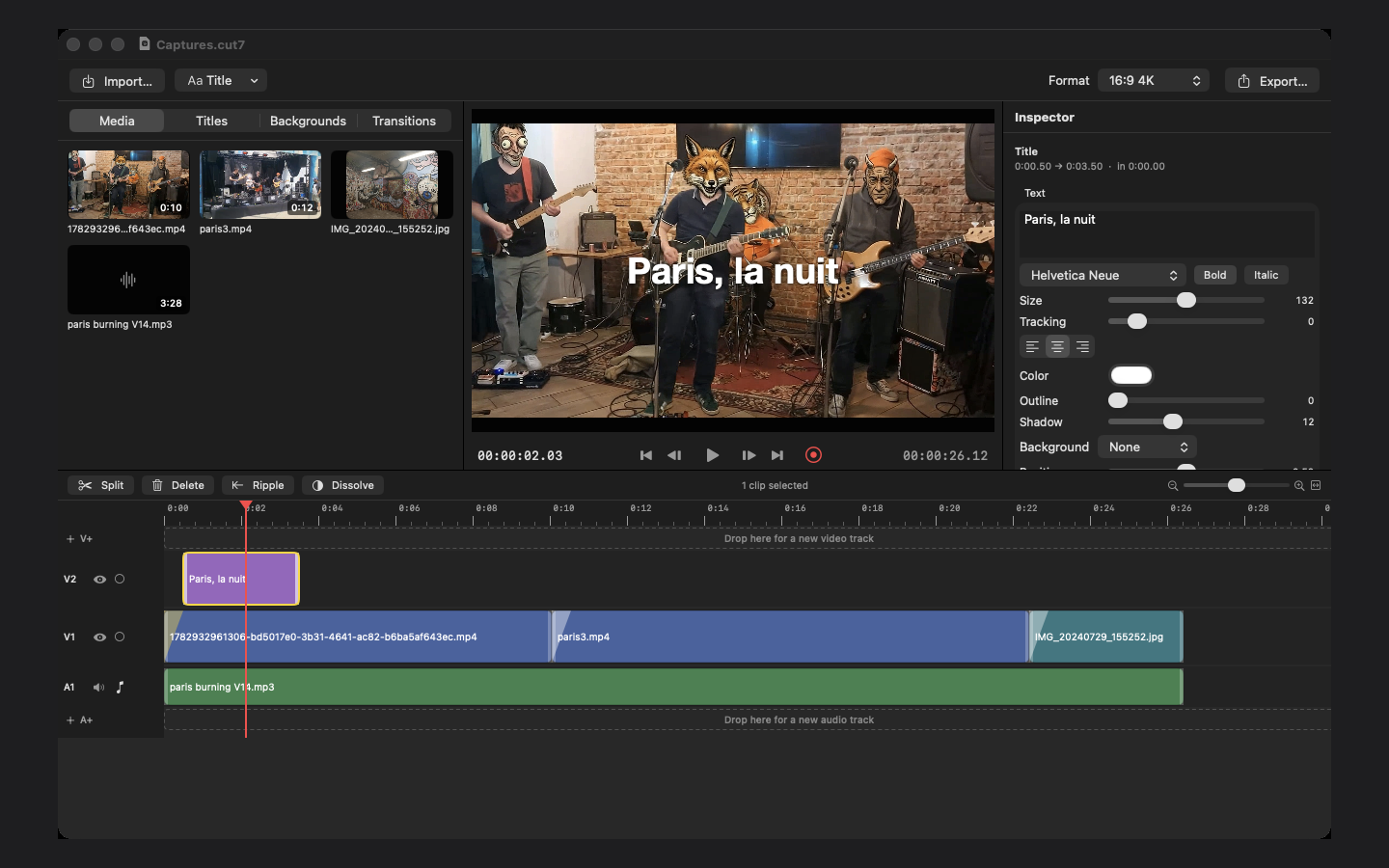
Twelve ready-made titles: big title, lower third, banner, typewriter, chapter, quote, end card… Twelve in and out animations, every font, outline, shadow, background, free position, and SRT subtitle import.
Sound that takes care of itself
Automatic ducking: the music drops the moment someone speaks, with a gentle attack and release. Voice-over recorded from the mic during playback, speech normalised, fades and per-clip volume.
Colour in one click
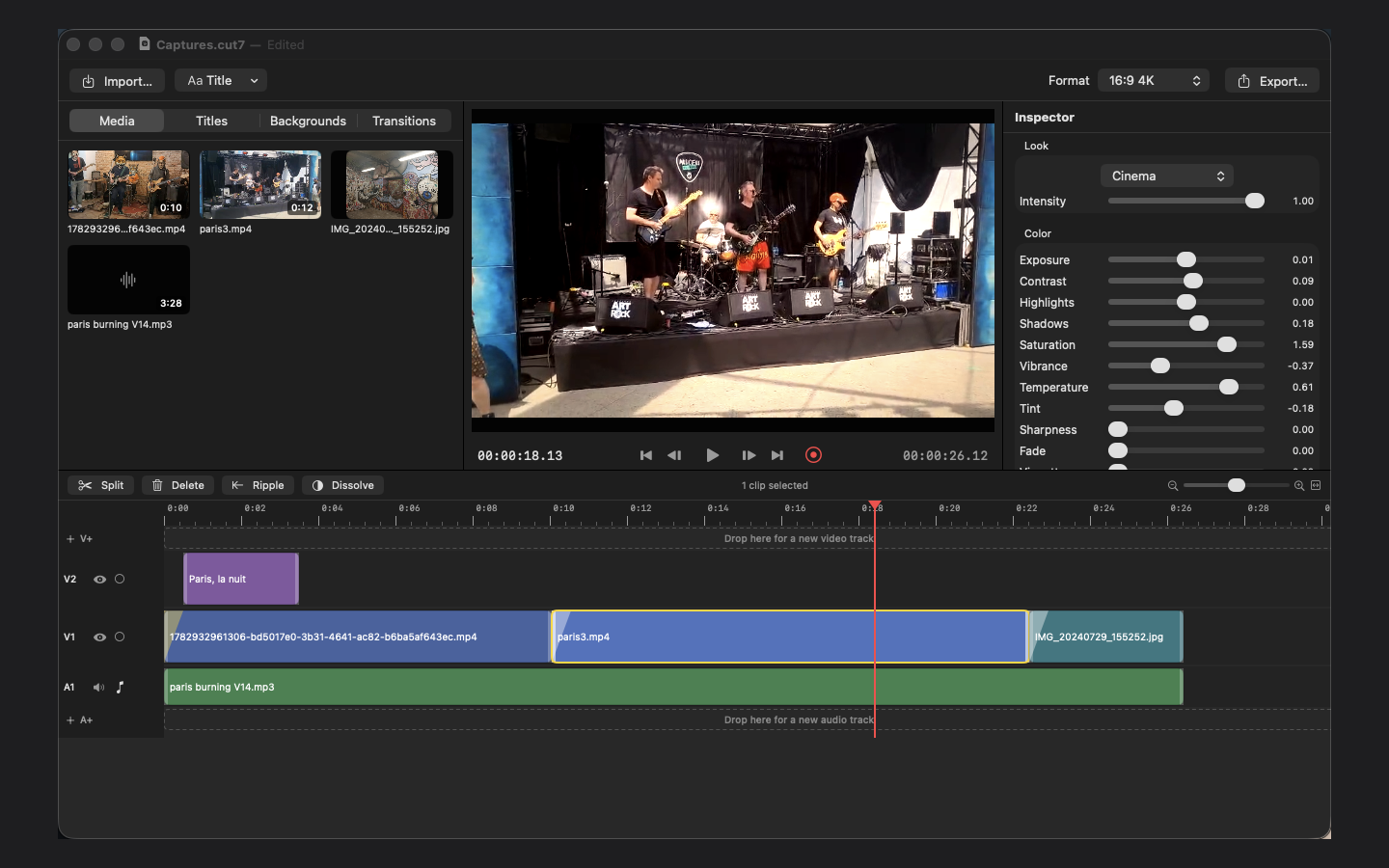
Sixteen looks with an intensity slider: Warm, Cool, Film, Teal & Orange, Cinema, Mono… Then exposure, contrast, saturation, temperature, vignette, grain. Automatic white balance, grade copied from one clip to another.
One project, every format
16:9, 9:16, 1:1 and 4:5, switchable at any time. Subject tracking detects faces and salient objects and keeps them in frame when the vertical format crops the image.
Export identical to the preview
YouTube 1080p and 4K presets, TikTok / Reels 9:16, Instagram square, Story 4:5, ProRes master. H.264, HEVC or ProRes, from 24 to 60 fps. Share to Messages, Mail, AirDrop or Photos right after export.
Colour · Look
A look in one click, fine controls if you want them
Pick a look, dial it in with the intensity slider, and adjust whatever you like in the Colour section. The monitor shows exactly what the export will produce.
Sixteen looks, from Warm to Mono, with adjustable intensity
Twelve fine controls, from contrast to grain
Copy and paste a grade from one clip to another
Projects are portable packages, moved from one Mac to another
16:99:161:14:54K
The “Cinema” look on a shot, Colour sliders in the inspector.
A title on its track, the Text inspector on the right, the result in the monitor.
Ready in three steps
No account, no setup: a folder of footage is all it takes.
Import your media
File › Import (⌘I) or drag videos, photos and music from the Finder into the library.
Edit
Double-click a media item to add it to the timeline, cut, add a title, let the music duck under the voice.
Export for each network
Pick a preset — YouTube, TikTok, Instagram — and share directly. The vertical format follows the subject automatically.
Version history
New versions are distributed through the Mac App Store.
1.0
October 2026 · Mac App Store
First public release: multitrack timeline, animated titles, automatic ducking, voice-over, colour looks
16:9, 9:16, 1:1, 4:5 and 4K formats, subject tracking on crop, per-network export presets
Projects as portable packages, moved media relinked in one click, unlimited undo
Interface in English and French
Support
A question, an export that doesn't come out as expected, an idea for improvement? Check the answers below or write to us.
Which version of macOS do I need?
CUT7 runs on macOS 14 (Sonoma) or later, on a Metal-capable Mac, Apple Silicon or Intel.
Which files can I import?
Anything macOS reads: H.264, HEVC, ProRes videos, JPEG, PNG and HEIC photos, AAC, MP3, WAV or AIFF music and voice. Phone videos are oriented automatically.
I moved my footage, the project shows “missing media”.
Click “Locate” in the banner and point to the new location: the project remembers the files and finds them again on the next launch. Projects are packages you can copy from one Mac to another with their media.
The voice-over won't record.
On the first ⌘R, macOS asks for microphone permission. If you declined it, grant it in System Settings › Privacy & Security › Microphone, then start recording again.
Will the export match the preview?
Yes, frame for frame: the same engine renders the monitor and the exported file. Pick a preset, or set codec, quality, frame rate and format yourself.
Do my projects leave my Mac?
No. CUT7 has no network connection, no account, no cloud. The microphone is used only for the local voice-over recording. See the privacy policy.